
Auto Report: Get Fleet Reports Emailed Automatically
Set up a report once and the platform emails it to you on schedule — daily, weekly or monthly. Here's how the Auto Report feature works.
Published on October 11, 2026
Most fleet managers need the same reports on a regular rhythm: yesterday's activity every morning, a weekly summary on Monday, a full month of figures for billing. Logging in to pull them each time is easy to forget — and easy to put off. The platform's Auto Report feature removes that step. You set a report up once, and it is emailed to you automatically on the schedule you choose.
What Auto Report Does
Auto Report lets you create a scheduled report for the vehicles you choose. At the time you set, the platform generates the report and sends it to the email addresses you've entered — no login, no manual export, no reminder in your calendar.
Setting Up an Auto Report
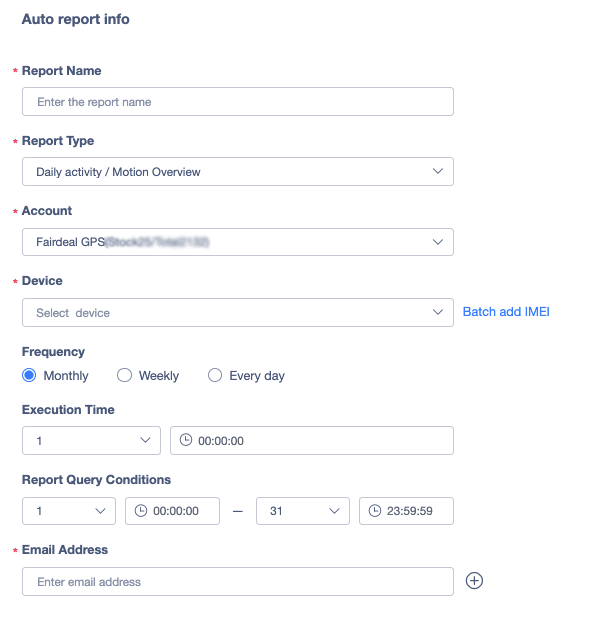
Creating one takes a few fields on a single form:
- Report name — a label you'll recognise later, such as "Weekly Fleet Summary" or "Month-End Mileage"
- Report type — the kind of report to send, for example Daily activity / Motion Overview
- Account — the account the vehicles belong to
- Device — pick the vehicles to include, or use Batch add IMEI to add many devices at once instead of selecting them one by one
- Frequency — monthly, weekly or every day
- Execution time — the day and time the report is generated and sent
- Report query conditions — the date and time range the report should cover, such as the first to the last day of the month
- Email address — who receives it; add more than one recipient with the plus button
Choosing the Right Schedule
The frequency you pick should match the decision the report supports:
- Every day — a morning snapshot of the previous day's vehicle activity, useful for dispatchers and operations teams
- Weekly — a regular review for supervisors, ideal for spotting patterns in idling, mileage or usage
- Monthly — a full-month report for billing, client reporting and management reviews
Because you control the report's date range separately from when it is sent, a monthly report can cover the whole month and arrive at the start of the next one.
Who Benefits
- Fleet and operations managers who want a consistent view of vehicle activity without checking the dashboard daily
- Finance and admin teams who need mileage and usage figures at month end
- Business owners and clients who want regular reports in their inbox without needing access to the platform
Built for Larger Fleets
If you manage dozens or hundreds of vehicles, adding devices in bulk by IMEI saves a lot of clicking, and a single scheduled report can cover the whole group. Different teams can receive different reports — set up one for each, with its own recipients.
Getting Started
Auto Report is available in the platform's report section. If you'd like help setting up your first scheduled report or choosing the right report type for your fleet, our team can walk you through it during a live demo. Request a demo or learn more about the IVMS.